Saturday, 9 February 2013

BA5 Studio Project | Production #25


Step by Step Guide to Importing Models Made in Maya to UDK

1: In Maya select & group the models you want to put into UDK. 

2: In Maya select file > export selection. 

3: When in the export selection menu go to the bottom of the menu and select FBXexport from the files of type drop down menu and then name your file. 

4: Whilst still in the export selection look to the right of the menu for a drop down menu named Geometry and check the box which says smooth mesh. 

NOTE: If you don’t have FBXexport or smoothing group options available then you need to activate them by going onto Maya > window > settings preferences > plug in manager > allocate the 2 boxes, 1 for FBX and the other for smoothing group > check them and apply. Now re do this stage and ensure these options are available. 

5: Press the Export Selection button and ensure it’s saved somewhere you remember (preferably in your Maya project folder). 

 
NOTE: you might encounter an error/warning box when you export, you can just close this.

 
6: Now you need to open UDK. You can do this either by using an allocated shortcut or by using the search programmes option > all programmes > game engines > Unreal Development Kit > open UDK EDITOR (Do not chose game, ensure you select editor). 

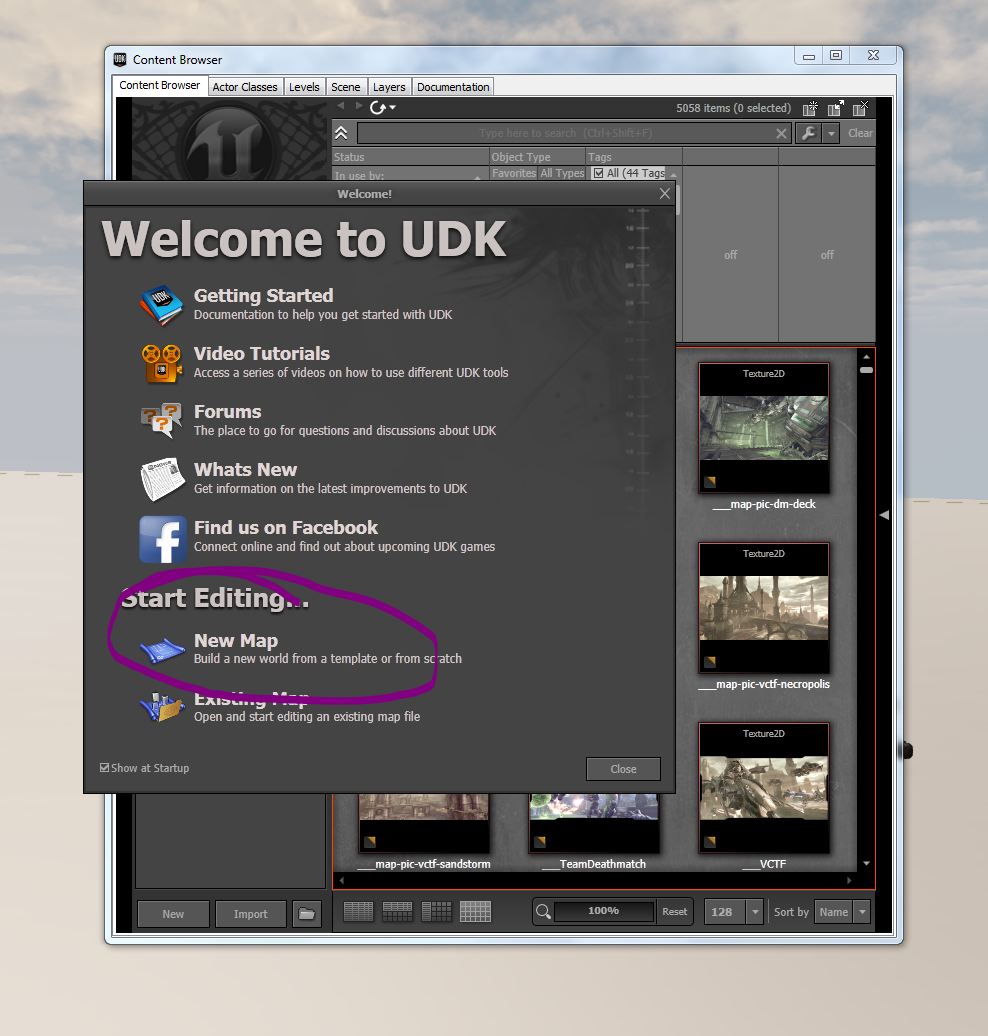
7: This will then bring up the Content Browser where you want to select the New Map option. 
 
8:  UDK will then want to know at what time of day you want your scene to be, Lothar informed us that models look best set at either afternoon lighting or morning lighting (this is hard for me because my game needs to be dark but this is a bridge I will cross at another time).

 
9: As you can see this now brings up the main UDK interface with your lighting preference set. You can now close the other windows as we need to set up our project fully. 


 10: All models ready for export to UDK are located in the Content Browser. To bring up the Content Browser menu you need to press the button next to the small binoculars at the top of the UDK interface > once pressed go to the bottom left of the Content Browser screen and select UDK Game Folder (drop it down) > then select the Content folder > click new (with the content drop down highlighted) > this creates your very own “package” which will contain all your assets for this scene. 

 
11: once you have created your new package you will need to name it and the model. Name the package > name the model where is simply says “name” > leave all other options alone > press ok.

 
12: You will likely have an animation window pop up, just ignore it and close it. 

13: Now we want to actually import our model into this package from our FBX file we created in Maya earlier. Firstly we need to make sure our package is there. Go back to the content Browser window > select packages > make sure yours pops up in the drop down menu’s on the bottom left.

14: As you can see, mines called UDK_Test and it’s there at the bottom of the Content Browser. To import my model into it I had to select the package > hit the import button at the bottom of the Content Browser.  

15: This will bring up the file import window which is where you need to locate your FBX file created in Maya > press open. 

 
16: This will bring up the import screen. Ensure you have the right package selected for import and that the name of your file is correct too > then press  ok.


17: You might get a pop up window saying that your FBX file is incompatible, you can ignore this and close it.

 
18: Select your FBX file containing your model and hit the import button. Your model should  now appear under your package in the UDK content browser. To put it into the UDK interface you need to select your package > locate the static mesh icon within your package on the content browser screen > middle mouse click and drag it into the UDK interface.

  
A problem we were all finding was that despite having our Maya dimensions set correctly our models would be tiny when we put them into UDK. I had to use the UDK scale tool to make my model bigger so I could actually see it. Either way my model worked and didn’t appear broken. I still need to texture it so when I do I can write up the UDK texture section of the guide but for now I must continue working on the model so that it’s totally ready. At least I can rest assured that its interactive ;D   

BA5 Studio Project | Production #24


Unwrapping the UV’s on the Photo Frame

Today I begin working on the UV’s for the photo frame which is on the bookshelf. I *think* I am getting the hang of the UV’s. I definitely just need to keep practicing.  Here is my workflow process. 

As Lothar suggested, I should decide the areas of focus and importance then split them into main areas to UV. The first area I decided was important was the area that would have the photograph. I decided to give this face its own UV map but selecting it > planar mapping along the X axis. 

 
The only issues I came across were that when I opened the UV editor I already had a net there as if I had used auto mapping; which I hadn’t. So I was a little confused…its probably supposed to be that way haha. My point is that it was distracting when I was trying to pull apart the UV I had just manually unwrapped (the frame front face) as I am still a little clumsy within the editor; must gain more confidence here! :D

 
I then moved onto mapping the front edges of the frame which face the player. These will also need a higher quality and therefore I have made the UV’s the same size as the picture area.  I also repeated the same process by selecting the inner faces which point inwards. 

 
Now that all the front areas, which are the most visible area to the player, I moved onto my “section 2” which are the outer borders of the frame. For these I did them separately and used a planar map projected along the Z and X axis to get an accurate map.


The only problem I seemed to face was the angle of the projection. As you can see the UV’s are diagonally orientated which I guess could be okay? I don’t really know, all I knew was that I would MUCH rather they were straight. 

 
To manipulate this I selected each of the edge verts in the UV map  and used the straighten tool on the UV editor to make the edges straight. 

 
This in turn ensured that the checker pattern was aligned correctly on the sides of the frames.  I repeated the process of selecting verts on the UV’s and using the straighten tool to make sure all the sides were correctly aligned.

 
I moved onto the front of the frame by selecting the front faces and then planar mapping from the correct axis to get the right projection. As you can see on the UV map the shape is mainly square, which is wrong, the shape of the frame is actually rectangular so I had to manipulate the shape to ensure it roughly matched the same shape of my model.  

  
I repeated the process so that I eventually had mapped the entire frame. I left the back faces smaller on the UV map because the player  just wouldn’t see them so it would be a waste of good UV space ;) 

 
Next job was to unwrap the frame stand which was slightly more difficult because of the angles and misshapen uvs that I had to sort out.  The way I tackled it was to assign faces of the frame to particular axis and planar map them accordingly. I would also map the top and bottom face at the same time. 


 There are still areas of the UV's I need to work on because they aren't perfectly square which obviously defeats the object but for now I am happy that these are unwrapped and ready to place onto the UV map.

Tuesday, 5 February 2013

BA5 Contextual Studies #05


What Does DLC Offer Players? 

One of the biggest draws and positive effects of DLC is the ability to give players extra hours worth of content! I mean, who can say no to that? If you put the money issues aside DLC can actually begin to make sense.

I mentioned previously that 10-15 years ago, people would play through their games, finish them and that was it. There wasn’t an option to get any extra content for your game. Once the story was over you wouldn’t get anymore no matter how much you loved it. The only way to get more was to wait for a sequel or possibly expansion pack but these, at the time, were large games in themselves and not churned out like DLC is today.
So, anyway, I will still be addressing the positive and negative implications of story DLC (even though I personally think that it’s *generally* a good thing). Lets start with the Positive! :D  

One of my favourite games is Fallout 3, I absolutely love it. When I heard about the story DLC expansions I was ecstatic. I couldn’t wait to plunge more hours into that game and have new areas to explore and play with. This is why, in my opinion, DLC is a good thing and the way Bethesda put it into the game was good.

Players bought the game, put the hours in, and just when they wanted more or were starting to run out of gameplay BAM! Bethesda release  five additional add-on campaigns for fans to get stuck into. These five add-ons were: 

OPERATION: ANCHORAGE
 
THE PITT
 
 
BROKEN STEEL 
  
POINT LOOKOUT
 

MOTHERSHIP ZETA 
 
  
Each DLC added hours upon hours more gameplay for fans as well as new trophies/achievements, loot, gear and quest lines.  The story continues but it’s not crucial for the player to purchase and play them which is good. Whist Operation Anchorage takes the ending to the game and alters it depending on how the player plays but, as there is no sequel to Fallout 3, it doesn’t *really* matter if the player chooses to buy it. 

Another good example of story DLC within a franchise can be seen in Borderlands 2.


Gearbox Software offered players the option to purchase the “Premiere Club” which would give them future DLC free/discounted. These future DLC’s were released to players shortly after the games release giving them time to actually play the game and be left wanting more. Examples of the DLC offered are:  
  
MR. TORGUE 
 
 
MECHROMANCER
 
  
Of course these DLC packs are fantastic, they add replay ability so that players feel they can jump back into or continue the game. Personally, even though they cost money, I think t hey are good. Id rather pay £15 for extra  campaign content than 50p (over and over) for new costumes and little small bits and pieces which are supposed to tempt me into spending more money.

Monday, 4 February 2013

BA5 Contextual Studies #04


Micro-Transactions 

In my previous post I wrote a list comprised of the fundamental areas I need to research in order to write a fully informed paper. I briefly touched upon the types of DLC in my presentation (see post #1) but now I want to discuss a controversial type of DLC which is dealt via micro transactions.

One of the most prominent types of DLC currently floating around the gaming industry are MICRO-TRANSACTIONS. What are micro-transactions I hear you ask? Well, it is when small payments are made by the player using actual real life money to purchase in game content such as new items, characters or weapons.

Micro-transactions are seem all over the place regarding the PSN Store and Xbox Marketplace. Players can buy avatars and clothes to customise their online appearance and match it to their personality as much as possible.

Avatars on PSN can cost anywhere between 20p and £1 and can be bought using the PSN store if the player  has their PS3 system hooked up to the internet. 
 An example of how an avatar can be purchased and used to define the players online status (this is my very own online profile).  

Micro-transactions have been around for ages in the gaming world but recently they have become the “norm” even with triple A titles. Players pay top buck for a new freshly released game only to then find content they need to pay more money for being released along side it. Is this a good thing?

One of the first examples of micro transactions being scrutinised was when Bethesda added a optional add on in the form of “Horse Armor” for its popular RPG Elder Scrolls IV: Oblivion.


The armor would protect the players horse from weaponry and other damage but cost 200 Microsoft points (£2.50). Many gamers felt this was a good thing but overall the community felt negative about having to add on an additional £2.50 to their already £50 game for one small piece of extra content. 

Looking at an old post from 2006 on the matter, Gamespot (http://uk.gamespot.com/) show some messages left by players on the subject of the horse armor (I tried to access the forum debate myself but the link didn’t work).

Positive
Mtpgamer:  "I agree that small stuff like that SHOULD be free, but in this day and age it's unlikely that we'll get a lot of 'free' content. If you are into the game as much as I am, you're going to shell out the $ for downloads. Microsoft knows this...so the best we can hope for is that it will be free (unlikely) or inexpensive (as is the case here).“

Negative
ReverieDLM:  "This is not a matter of it being expensive in the grand scheme of things. This is not a matter of it being a requirement to buy. It's a matter of basically spitting in the consumer's collective face. Something like horse armor is a trivial addition to the game. Xbox 360 owners already paid more for the game than PC owners, charging [Xbox 360 owners] for something that is then free on the PC is an absolutely disgusting disregard for the consumer. Bethesda should be ashamed of it."
  
Current Day Micro-Transactions 

Despite the negative impact of the horse armor upon the Oblivion gaming community micro transactions have continued to evolve throughout the current generation of games. Some modern examples of micro transactions can be found in Naughty Dog's smash hit Uncharted 3 (well, it’s multiplayer mode anyway). 


The game has a loot drop scheme where players can pick up randomly dropped treasures which alter depending on their rarity. The treasure may then unlock a new weapon, skin or other form of customisation unique to that player and those who also have found that specific treasure.

However,  this soon turned into rough competition where players complained they couldn’t unlock certain treasures no matter how much they played or farmed game modes; these treasures weren't dropping and they couldn’t get the special item they wanted. This led to Naughty Dog offering micro transactions to players who wanted to just buy the item they were trying to find in game for small amounts of money instead of waiting for it to become unlocked.

There were negative and positive feedback for this form of DLC, many players argued saying they were going to keep farming and that they shouldn’t have to pay for ingame content but other players thought it was good because they were fed up of having to wait for the precious treasure to drop. I farmed a co-op mode on Uncharted 3 for hours with a friend who got the treasure I needed TWICE and it NEVER dropped for me! So I was sort of glad I was able to by it. Although actually unlocking it would have felt far more rewarding. Damn those kitty ears >:)  

Having said this, to test the water (I guess?) Naughty Dog released hats which players could unlock by finding treasures just like all the other items, however, these ere the first items made available to buy via micro transactions. 


 Valve actually started the hat craze in 2009 where a series of hats were introduced to the game among an update made available. This sparked a phenomenon where players began to build their own hats and sell them for small amount of real money as well as Valve making more for the players to buy in the form of micro transactions.


Of course these are all very mixed approaches to micro transactions. When you look at Free2Play games which survive of micro transactions then you can begin to understand why they can be viewed negatively. Free2Play games offer the game for free but in return the player must buy the necessary downloadable content for the buy via micro transactions. This way they player can progress through the game. Gamers argue that if they pay for a game then anything worthy of a micro transaction amount of money should come free.

I must make a comment on the most recent form of micro transaction, however, which is being released with upcoming triple A title by Visceral Games, Dead Space 3.  


 Recently it was announced that Dead Space 3 would ship with 11 pieces of “day 1 DLC” including micro transactions. I found a really interesting article written by Lee Bradley (staff writer at X360 Achievements, http://www.xbox360achievements.org/author/lee-bradley/) which has some valid points about the micro transactions and why they are being introduced to console games.

XBOX 360 Achievements: The Scary Reality of Dead Space 3's Micro Transactions 
 
More Useful Links for my Essay

Here are links I have been finding today which have helped me become more informed about micro transactions and the great DLC debate. I am posting them for future reference so I can refer to them in my essay if I need to. 

http://www.gatheryourparty.com/articles/2012/04/24/the-problems-with-dlc/